Saturday, August 31, 2013

Some news from the oxygen world

oxygen-gtk

Last week we've released two feature versions of oxygen-gtk, namely 1.4.0 for oxygen-gtk2 and 1.2.0 for oxygen-gtk3.

Alongside with the usual amount of bug fixes, the main new feature of these releases is the ability to get them compiled and working on non-linux operating systems, and more precisely on windows (see screenshot).

The Gimp, running on Windows (tm) with oxygen-gtk

The process of compiling oxygen-gtk2 and oxygen-gtk3 on windows is somewhat complicated (requires cmake, MinGW, gtk2/gtk3). Forcing applications such as Gimp or Pidgin to use the style - once it is successfuly compiled - is even more complicated, since these applications are usually distributed with bundled versions of gtk and standalone configuration files. Describing this is beyond the scope of this post and daring users will have to resort to google to get it right.

For the gtk3 version, we also enabled support for non X11 backends, such as Broadway, which allows to run gtk applications in your browser, via HTML5.
Oxygen-gtk3-demo, embedded into a web browser, using the Broadway backend


oxygen-qt

For the kde/qt version, oxygen has been successfully ported to KDE-Frameworks 5. This allows to use oxygen together with Qt5 (see screenshot) and ensures that Oxygen will still be available for future releases of KDE.

Some text editor using oxygen-qt together with qt-5.0.2

There is some development foreseen for oxygen before it is released alongside with KDE Frameworks 5.0, in view of revisiting spacing and alignment between widgets, and making the whole style more DPI independent.

Tuesday, January 17, 2012

Oxygen-gtk3 1.0 is out


The first release of KDE's Oxygen widget theme, ported to GTK 3.X applications, has been uploaded to kde ftp servers on Tuesday January 17 2012 and is available for download here. It is called oxygen-gtk3.

This release is still experimental, notably due to the small amount of GTK 3 applications it has been tested on. Still, since snapshots of the running git repository were already being circulated around for some time, we deemed it appropriate to release the current code, if only because it would make book-keeping and bug tracking easier. Also, we expect rapid progress as bug reports are being filled by users.

The result is already quite satisfactory, as illustrated on the screenshot below.


All the features of the GTK 2.x version have successfully been ported to the GTK 3.x version, and a large fraction of the code base is actually shared between the two. This includes:
  • grabbing windows from empty areas;
  • smooth animations on mouse hover and focus change
  • on fly update of the style appearance when the configuration is changed (via KDE's system settings, or oxygen-settings)

Bug reports should preferentially be filled on KDE's bug tracker, here, rather than on this blog, or on the kde-look web site. This ensures easier interactions with the reporting users.

Like for the GTK 2.x version, there will be one minor bug-fix release every month, and one major feature release every 6 month, more or less in sync with newest KDE release.

The third major release (v1.2.0) of the GTK 2.x port has also been released on the same day and is available for download here. The package name has been changed to oxygen-gtk2, to avoid confusion with the GTK 3.x version. It includes all the bug fixes that were applied to the 1.1 series, together with visual improvements that match the Qt version shipped by KDE 4.8.

Thursday, June 16, 2011

Oxygen-gtk 1.1 is out


The first major release of Oxygen-gtk has been uploaded to kde ftp servers on Wednesday June 15 and is available for download here.

This release comes with many improvements over the 1.0 series, which include:
  • animations (smooth glow on mouse-over and focus for virtually all widgets, similar with what exists for the Qt version), controlled using the same configuration options as the Qt version, via oxygen-settings;
  • on-fly update of the applications when configuration options are changed, via interfacing of the style to dbus;
  • improvement of the rendering of many widgets to have better consistency with the Qt version of oxygen, and remain in sync with latest design changes that will be shipped with KDE4.7. This affects notably scrollbars, sliders, groupboxes (Aka GtkFrames), etc;
  • real inner shadows for lists, icon views and other text edition widgets (thanks to Ruslan for making this possible);
  • better integration with oxygen's window decoration (effective only with kde 4.7), in the sense that the decoration will detect applications for which the window background gradient cannot be rendered (such as Firefox, Thunderbird, open-office, etc.), and consistently paint itself flat;
  • support for KWin's new shadow system, that applies to menus, drop-down lists and tooltips;
  • a dedicated demo application, called oxygen-gtk-demo, which is similar (though not identical) to its oxygen-demo Qt counterpart, as illustrated in the screenshot below.
oxygen-gtk-demo


This release is meant to be used with KDE SC 4.7, which should become available some time this summer, due to the redesign of some Qt widgets that will be shipped with it. In the meanwhile, users will experience some visual inconsistencies (nothing dramatic though), and might prefer to stick to the 1.0 version.

As for the 1.0 series, we (Ruslan, Cédric and I) will provide some monthly bugfix releases of the 1.1 version, based on bugs reported to us at bugs.kde.org. In parallel we will work on the next major release (1.2), focusing notably (and without any warranty) on the gtk3 port as well as on making oxygen-gtk a more standalone gtk widget style, that can also be used seamlessly outside of KDE.

Sunday, April 17, 2011

User experience, one pixel at a time

  • A couple of weeks ago, I've been attending 2011 user experience Sprint, in Berlin. That was interesting and nice and productive and everything, and above all it was my first live encounter with other KDE people, including Nuno.

There's been (notably) quite some discussions about how information and functionality should be presented to users, organized and formulated, in order to be complete but not overwhelming, sexy, gratifying, and elegant.

Now, no matter how well organized resources, features, and information are, a significant fraction of the above can be wasted if every single brick of the UI is not rendered perfectly.

So Nuno (finger above) and I have been focusing on the remaining UI elements for which we are not fully satisfied, pretty much disregarding how these elements are used later on.

Two screenshots to illustrate the progress we've made during these few days.

First screenshot is Dolphin:
Things one notices:
  • more visible pressed tool buttons at the top
  • new slider at the bottom
  • and new folder icons (quite unrelated with this post actually), on which Nuno has been working lately (and I'm sure he would blog better than I about it).
Things one does not notice (but with which we are happy):
  • improved holes for the scrollbars, progressbars, and main view (note notably how the main view bottom corners are better rounded)
  • improved (well, bug fixed) rendering of the capacity bar at the bottom.
To give proper credit to whom it belongs, some of the improvements above have been primarily instigated by Peter Penz, Dolphin dev.

Second screenshot is K3B:K3B is using nice title frames all over the place for quite some time now (the icons and text over a blue background on the picture above), but which have not been rendered properly by oxygen so far (notably, there was one or two pixel between the frame shadow and the blue content, that was pretty much wasting all the effort). So we finally took some time to fix it, resulting in the above, which is closer, I think, to what was originally intended.

We've made other changes here and there and we still have some in the pipe before KDE 4.7 is out. Most of them are barely noticeable but we believe it will make oxygen look sharper, more polished and pleasant to the eye, one pixel at a time.

Tuesday, April 12, 2011

A taste of things to come

1. Oxygen-gtk

Oxygen-gtk version 1.1.0 will be out some time in June. It will come with a number of new features listed below:
  • interface to dbus that allows on-fly update of the applications on configuration changes (as already documented here)
  • a complete set of mouse-over and focus animations identical to what is available for the Qt version, and configurable using oxygen-settings. This includes smooth highlight effects of buttons, text fields, menu and menubar items, lists, etc.
  • improved consistency with the Qt style: we finally implemented the same design as in Qt for named frames, and Ruslan Kabatsayev did a great job at implementing extended inner shadows in lists and text widgets. This is all illustrated in the screenshot below.


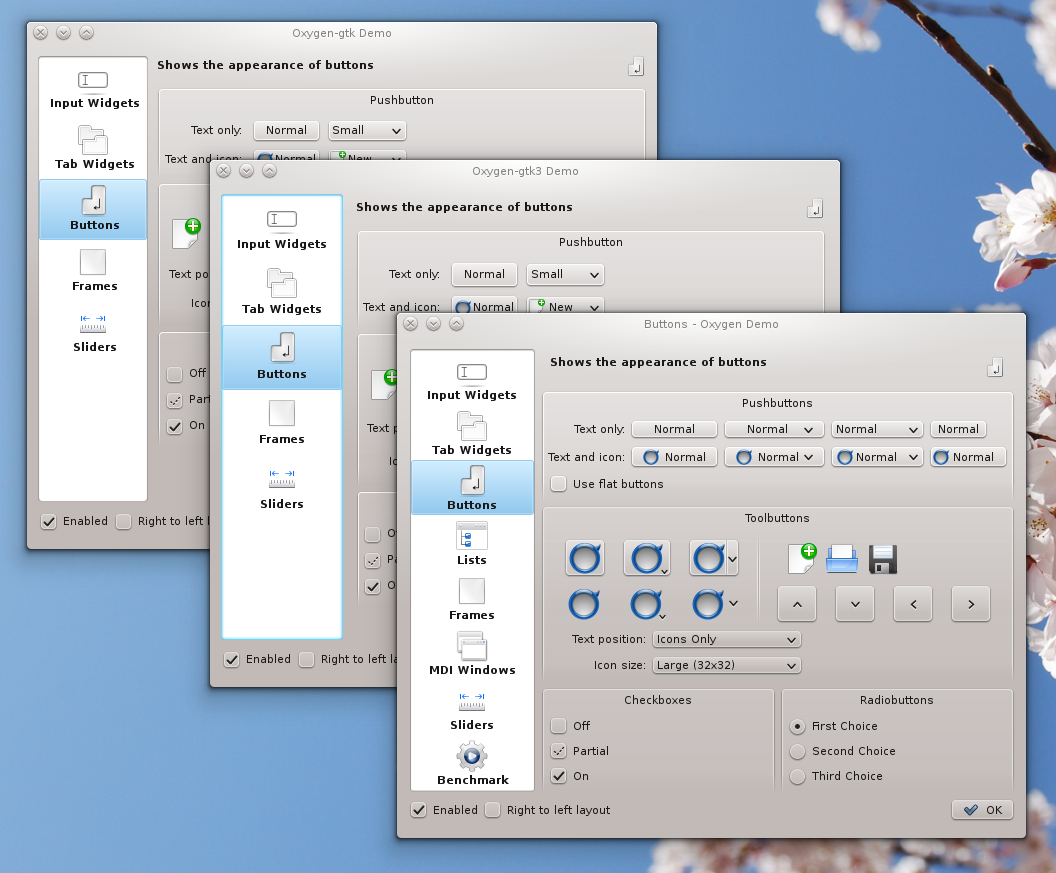
three toolkits, one widget style


2. Gtk3

Oxygen-gtk has been ported to the brand new Gtk3 toolkit, with practically no feature loss with respect to its Gtk2 incarnation. Despite GTK3's complete rewrite of the styling API, the porting turned out to be less painful than originally thought, notably thanks to the high segmentation of our code. From the limited set of applications we could test it on so far, this port is working quite well, as also illustrated in the screenshot above. Obviously all three windows are not pixel-perfect identical, and the metrics of various widgets somewhat vary from one toolkit to the other, but the overall consistency is quite satisfying, already, in my humble opinion.

Now, this is definitely not ready for release yet, notably because of the quite small amount of Gtk3-ready applications we could find on the web, for testing. Also, we had to seriously bypass (hack) the rather limited API of the new theming engine in order to be able to implement all features present in Oxygen's Qt and Gtk2 incarnations. Anyway, the code is available from our git repository using the command:
git clone -b gtk3 git://anongit.kde.org/oxygen-gtk


3. Shadows

We've been collaborating with KWin dev Martin Graesslin on a new shadow system that let the widget style render the shadows for menus, tooltips, drop-down list, etc. This new feature, also documented here, allows Oxygen to render the same shadows for the widgets listed above as for normal decorated windows, thus improving consistency. The result is illustrated in the next two screenshots, first for a Qt application, second for a famous XUL + Gtk application. Note notably how the menu in the second screenshot have square corners, due to an XUL limitation, and how we adapt the shadow rendering to that case, something which was not possible in the past.


Finally, for the first time I'll meet in person with Nuno in a couple of days, and we'll take this opportunity to revisit (and hopefully improve) the last few UI elements with which he is not so happy today. In the process of doing so, we will notably incorporate some quite useful input from Dolphin dev, Peter Penz.

All the above should become available to everyone by the time KDE-4.7 is out, so stay tune.

Saturday, January 8, 2011

Oxygen + Gtk + DBus

Definitions:
  • Gtk: one of the most widely used toolkit to write opensource applications for your desktop, the second one being Qt, used notably for all KDE applications;
  • Oxygen: refers (notably) to KDE's default widget's style, originally written for Qt/KDE applications only;
  • DBus: inter-process communication system used for applications to communicate between each-other. In KDE it is used notably for propagating configuration changes (such as the color scheme) to KDE applications.
This post introduced oxygen-gtk, a native port of the KDE's default widget style to the Gtk toolkit, which allowed applications such as Gimp, Inkscape, and many others, to integrate seamlessly in the KDE desktop. This style was written to follow most of KDE configuration options, such as the icon theme, icon sizes, fonts, etc. However any change to the KDE configuration was only accounted for by GTK applications after the latter were restarted.

Today, we added DBus support to oxygen-gtk, so that Gtk applications keep track of modifications to KDE's configuration and update themselves on fly. This is best illustrated by the screencast below, during which color scheme and font size are changed in KDE's system settings, and Gimp updates accordingly without restart.


This feature is already available for testing in oxygen-gtk's git repository. It will be included in the next feature release of oxygen-gtk (version 1.1.0), some time in June.

mmm... recording a screencast in KDE. Which application should I use ? qt-recordmydesktop, or gtk-recordmydesktop:


Friday, November 26, 2010

Oxygen + Gtk

For the past few month, Ruslan Kabatsayev, Cédric Bellegarde and I have been working on writing (yet another) Gtk port of KDE's oxygen widget style.

Unlike previous attempts we decided to
  • start a new gtk-engine from scratch (as opposed to re-using an existing one). All painting is performed using Cairo; there is no hidden interfacing to Qt, nor hard-coded pixmaps.
  • stick as close as possible to KDE's and oxygen's options. Amongst other things, the engine loads kde palette, icons, and fonts; it respects the color contrast setting, and a number of oxygen's display options (such as the tab style, the list's expander style, the scrollbar width, etc.)
  • try implement at least some of the fancy features of KDE's Oxygen style. Amongst other things, we added mouse-over effects on almost all widgets; support for ARGB colormap (in order to have nice non-pixelated corners for menus, combo boxes or tooltips), and full support for grabbing windows from empty areas (a feature that is in KDE's Oxygen since KDE SC 4.5). We also have plans for adding a large number of the animations found in KDE's Oxygen style, but that will be for the next release.
The primary goal of this port is to improve significantly the integration of Gtk/Gnome applications in KDE. However, we also aim to provide Oxygen as a modern, professional and polished theme for other desktop environments, that works seamlessly without having KDE even installed.

Some screenshots are available at the end of this post.

The sources for this first release are available on KDE ftp servers. We plan to follow the same release plan as KDE:
  • one minor bug-fixing release every month,
  • one major feature release every 6 month
Daring users can also get the latest sources from the git repository directly. We are hosted by git.kde.org.

Bug reports and feature requests can be sent to KDE bug tracking system. When doing so one should select product=Oxygen, and component=gtk-engine.

One can also talk to the developers and give direct feedback on IRC, channel #oxygen (ask for hugo).

Now for the screenshots:

Nautilus (front) and Dolphin (back)


GEdit (front) and Kate (back)


Compiz Config Settings Manager (CCSM)


Mandriva's RPM manager (urpmi)


Firefox (unthemed)

Thursday, September 9, 2010

Performance issues, one script, and call for testers


Since kde4.5 is out, a number of users with various NVidia graphic cards suffer from performance issues when using the oxygen style:
  • Lag, when scrolling some large views, like, e.g. in Dolphin
  • system becoming unresponsive over time
  • etc.
It is hard for me to anticipate such issues, as well as to fix them, since I have an integrated Intel graphic card, and none of these are present (believe me, my oxygen is snappy, I would not commit the changes otherwise). The curl pit appears to be the number of pixmaps that oxygen allocates, and stores in caches, to perform its animations. The fuller the caches would become the more unresponsive the system would be. I'm not 100% sure about it, but so it seems.

So I've been trying to optimize the code, and reduce the number of allocated pixmaps. Its a bit like shooting in the dark, since I can't see much difference here, from one change to the other.

Last night I made a decisive step in this direction by applying some discretization to the various animations, effectively reducing the number of cached pixmaps by a factor 10 to 20 (it's configurable), normally without any noticeable difference to the eye.

Now, well, I need testers (with an NVidia graphic card, and with a driver for which some of the problems above are present).

For users willing to help, I wrote a script available here that allows one to checkout, configure, compile, and install oxygen sources from kde svn trunk, without the need for compiling anything else of kde.

It should work against any kde4.4 and kde4.5 version, as well as trunk, naturally.

To use the script one must:
  • create a clean directory
  • run the script and follow instructions
One needs to have the necessary development packages installed for the sources to compile. They are: gcc-c++, subversion, cmake, kdebase-workspace-devel, libxrender-devel, libx11-devel (note that the names might change from one linux distribution to the other).

Once the code is successfully compiled and installed, any newly launched application should use the latest oxygen as opposed to the one provided by your distribution (which gets erased in the process).

I'll be available for debugging, in case of trouble.

If the patches I committed to trunk recently are effectively fixing the issues above, I'll backport them to the kde4.5 branch (and to oxygen-transparent), so that hopefully kde4.5.2 can benefit from it.

Notes:
  • kde anonymous svn is sometimes not very responsive and the checkout or update will fail. Just take a deep breath, wait 5 minutes, and retry.
  • in case one wants to revert to the 4.5 version of oxygen, one can run the same script (in a separate directory), with the additional argument --branch 4.5
Edit:
  • Since the feedback on the recent commits is largely positive, last night I backported the changes to the kde4.5 branch. So that hopefully this oxygen+nvidia issue will all be fixed in kde4.5.2. You can run oxygen-setup.pl --branch 4.5 to get this code, instead of the one from trunk (which has many other unrelated changes).
  • I also backported the change to oxygen-transparent

Monday, August 23, 2010

Oxygen rewrite and Dragging tabs around

This is a technical post, with a small video for entertainment.

Today, a major change to the oxygen code was committed to SVN, so that the style now derives from QCommonStyle as opposed to KStyle in the past. This is the first (and most difficult) step towards writing a fork of the oxygen widget style that would depend on Qt only, and not on KDE, so that one could, for instance, use oxygen natively on Windows (TM) for all Qt applications. Additionally, this change also results in better performances in painting widgets, and a more maintainable code.

This effectively constitutes a quasi-complete rewrite of the oxygen core code, as illustrated by the number of lines removed and added, from the svn commit log:
M +6227 -5224 oxygenstyle.cpp
M +886 -310 oxygenstyle.h
Hopefully no functionality have been lost and no regression introduced, although to be honest, further testing is needed, and more pairs of eyes than just mine (hence the commit).

While rewriting, some of the remaining oxygen visual bugs that I know of have been fixed, concerning notably how tabs are displayed when the active tab is being dragged around. (Tab widgets are by far the most difficult Qt widgets to render properly in the style). The result is illustrated in the following screencast.


Notes:
  • the animation itself is provided by Qt, not by oxygen;
  • it was already supported in kde4.4 and kde4.5. Unfortunately it had some visual glitches that are now fixed;
  • the application used for the demonstration is oxygen-demo, from kde svn trunk (it has been modified since kde4.5 to handle movable tabs). It is available from the command line since KDE4.5.0, serves as a showcase on how widgets are rendered with oxygen (or any other style), and as a visual debugging tool for me;
  • the same feature is available in e.g. Dolphin, and kmail;
  • unfortunately (in my opinion), other applications such as konqueror and konsole, use their own private mechanism to drag tabs around. I wish they would rely on Qt only instead, for consistency across applications, and since it is a 'one line of code', literally, namely:
tabBar->setMovable( true );

Sunday, July 18, 2010

some oxygen screenshots in kde SC 4.5

KDE SC 4.5 (release candidate) is out, so I figured I could post some screenshots of how oxygen looks like in this release. We payed a lot of attention to detail polishing, fixing 1 pixel here and there at a time, to
  • improve alignment between widgets
  • make borders sharper, visible notably in menus, comboboxes, MDI windows (although they are largerly unused)
  • fix glitches where widgets would interact one with another (notably in tabbed view)
So, not much innovation graphics wise in kde4.5 with respect to kde4.4, but the former should just feel better than the latter, without one being able to pinpoint what it really comes from (the devil is in the details).

Note that we did change the buttons a bit (based on the huge feedback from the previous post), in a subtle way that will for sure not make everyone happy (this you can never achieve), but hopefully won't displease people who liked them already, and will satisfy some of the people who complained.

As discussed in other posts there are new features though:
  • more widget animations
  • more configuration options, using oxygen-settings (give a try to follow-mouse animations for menus, menubars and toolbars, for instance)
  • the ability to move windows by clicking in empty areas
Now the screenshots:


What we have in mind for kde4.6 (in arbitrary order of preference, and without any guaranty of having any of these actually implemented):
  • support for consistent transparency (+blur) in the style and the decoration
  • support for sideways decoration title
  • having a Qt-only oxygen style (because I wish my Qt apps running on windows could use oxygen without having to install the entire kde suite)
  • on the tech-side: optimization of pixmaps caching in the style (because it seems to cause problems to some users)
  • and of course (with highest priority): bug fixing and optimization

Tuesday, June 15, 2010

What's wrong with oxygen buttons ?


Since there are recurring complains about how oxygen buttons look like, and requests to make them more beautiful, whereas, on the other hand, both Pinheiro and I are quite happy with them (we are, really), I'd like to gather some more details about what's really wrong with them.

Picture on the top-left shows basically all the buttons that oxygen can draw. I'd like to know what's not right with them. Margins? Shadows? Gradients? The way they look when pressed?

Things like: "they're ugly", and without any constructive idea to counterbalance the statement will be ignored. Also, things like "they should look like plastique" (or any other theme) will not help much either (since this is precisely the point of oxygen, not to look like plastique).

Other than that, if anyone has comments on these, or even better: mockups, feel free.

Sunday, June 13, 2010

Moving windows around

A new feature added to Oxygen for KDE SC 4.5 is the possibility to move windows around by clicking (with left mouse button) in any of its 'empty' area and dragging it around, in a way that is similar to what one usually does with the window decoration titlebar.

How this works is illustrated in the following screencast (sorry for the poor quality of the video):


This feature has been present in bespin (another kde4 widget style) for quite a while. It has been ported (and largely rewritten) to Oxygen, on popular demand.

It is believed to be very useful, notably on touch-screens, for which dragging windows from the sometimes tiny decoration titlebar might end up being problematic.

Now, this is still quite experimental and conflicts might exist between dragging the window and some other mouse actions for some applications. I hope we can identify, and fix, most of these conflicts in KDE SC 4.5 beta cycle, so that a well crafter and fully functional feature can be delivered to users with the first release candidate.

oxygen-settings

Since KDE SC 4.4 many hidden options have been added to oxygen to 'fine-tune' the appearance of widgets and window decorations. At the time, they have been made hidden, in order not to scare normal users by facing them with a large number of choices with most of which they would have no idea what to do.

As a drawback, there was a number of bug reports and wishes from advanced users asking for features and configure options which in fact were already there, but not easily accessible. The answer to such reports have been: "edit your configuration file (usually $HOME/.kde4/share/config/oxygenrc), and add this or that line, in this or that section". Not very satisfactory.

For KDE SC 4.5, a new application has been added to remedy the above. It is called oxygen-settings (it runs from either krunner or one's favorite terminal), and provides access to all the previously hidden options. The other advantage of oxygen-settings is that all options for both the widget style and window decoration are regrouped at the same place, fewer clicks away one from the other.

Hopefully this addition will make advanced users happy, without scaring normal users, who would not care about all the functionalities offered here.

Below are a few screenshots of this application.

The first page, corresponding to widgets' style configuration:


The animations page:


It allows to customize each animation used in the widget style independently from the other.

The window decoration page:


It is very similar to what's available in KDE's configuration tool (systemsettings) but includes a number of additional, otherwise hidden, options


After about a year coding for KDE's Oxygen widget style and window decoration, and because KDE SC 4.5 is around the corner (first two beta versions are already out), I finally decided to start a blog to:

  • advertise new features
  • gather comments
  • get feedback
This is not about oxygen icons (icons are Nuno's realm), this is about how widgets and window decorations look like, how they animate, and how to make it all look better.

Followers